SMS Opt-In
Program
Peer Messenger Phone Verification — transactional one-time passcodes (OTP) for account sign-in only. No promotional or marketing SMS.
Web opt-in (reference form)
The live consent flow is in the Peer Messenger mobile app. This page shows the same disclosures and consent pattern reviewers expect for toll-free verification.
Mobile app opt-in
End users opt in inside the Peer Messenger app (iOS / Android / macOS) using the same disclosures and unchecked consent box:
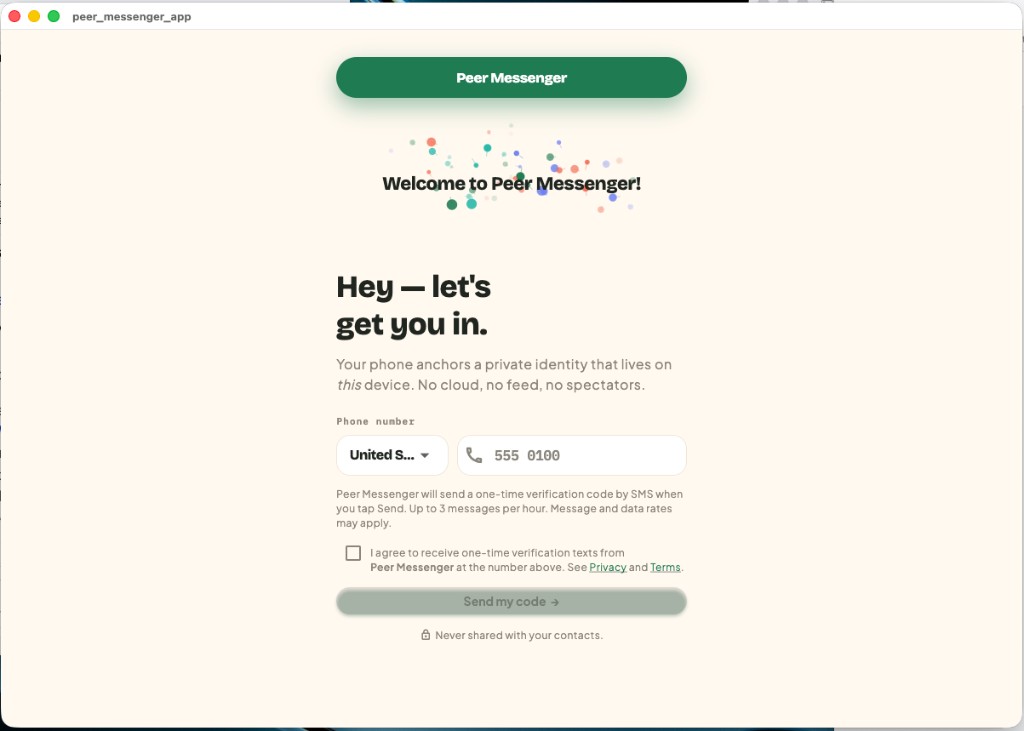
- Open the app and enter a mobile phone number.
- Read the SMS disclosure (frequency, rates, links to Privacy and Terms).
- Check the consent box (unchecked by default).
- Tap Send my code to request a one-time verification SMS.
Sample message
123456 is your Peer Messenger verification code. It expires in a few minutes.
Help and opt-out
- Help: support@peermessage.net
- Opt-out: Verification SMS are sent only when you request a code. Do not request a code to avoid messages. Account deletion: support@peermessage.net.
- Non-sharing: Mobile numbers and SMS consent are not shared with third parties or affiliates for marketing. See our Privacy Policy.
Twilio submission text
Use case: One-time account verification (2FA/OTP) from Peer Messenger toll-free number. End users opt in in the Peer Messenger mobile app or via the reference form at https://peermessage.net/optin.html. Users enter their mobile number, read disclosures, and check an unchecked consent box before tapping Send. Message and data rates may apply. Up to 3 verification messages per hour. No marketing SMS. Privacy: https://peermessage.net/privacy.html Terms: https://peermessage.net/terms.html